


Is your office computer crashing during important work? You’re not alone. pc crashing issues in Dubai affect businesses every day, disrupting work and causing stress.
In companies across Dubai, frequent pc crashing issues in Dubai can slow down work, lead to data loss, and interrupt daily operations. While some problems need IT support, there’s one simple Windows command that can help you quickly check and fix system recovery settings.
In this blog, we’ll show you a fix—and explain when you should call expert it amc services in Dubai for long-term peace of mind.

Why Do PCs Crash in Office Environments?
Before jumping into the fix lets understand what’s really happening when your computer fails.
Common causes include:
- System files that prevent normal operation
- Disabled recovery environment settings
- Software conflicts between applications
- Improper shutdowns that damage system components
- Outdated system configurations
Many businesses ignore these warning signs until systems completely fail. When you’re dealing with pc crashing issues in Dubai, ignoring the problem only makes it worse.
Quick Fix: Check Windows Recovery Using This Command
Here’s a method that can help diagnose your system immediately. Follow these steps carefully:
Step-by-Step Instructions:
- Press the Windows key on your keyboard
- Type “Command Prompt” in the search bar
- Right-click on Command Prompt. Choose “Run as administrator” from the menu
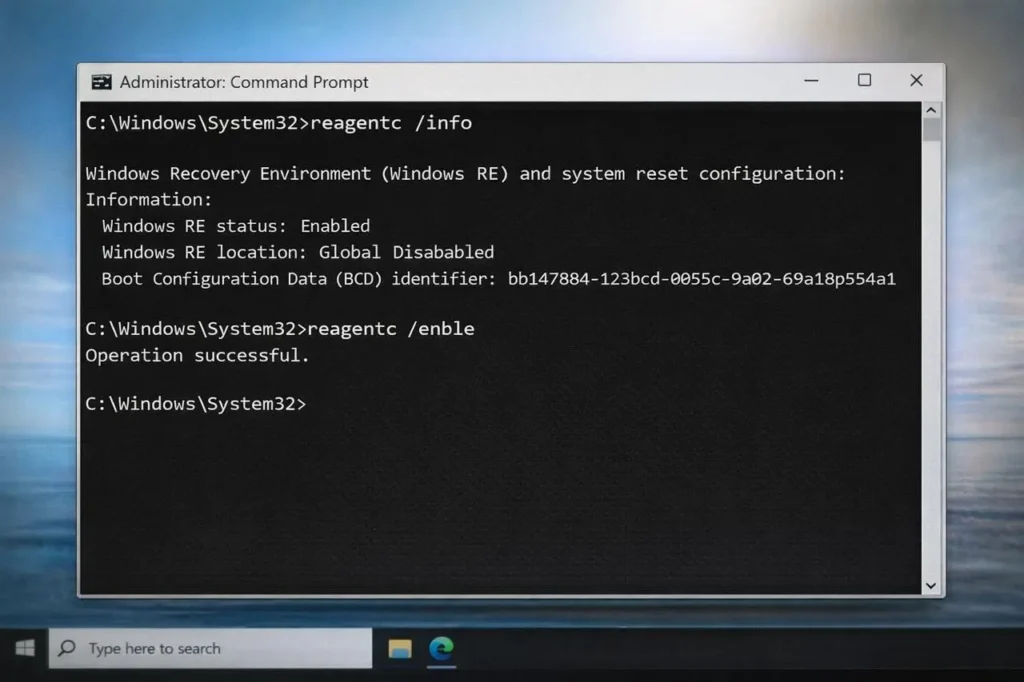
- Type this command as shown: “reagentc /info “
- Press Enter to run the command
- This command checks whether your Windows Recovery Environment (WinRE) is enabled on your system.
What the Result Means
After running the command, you’ll see one of two results:
If you see “Windows RE Status: Enabled”, your system is safe. This means your PC can recover from startup problems automatically when pc crashing issues in Dubai occur.
If you see “Disabled” – This is a problem. Your system won’t be able to repair itself when crashes happen.
How to Enable It (If Disabled)
If your recovery environment is disabled, don’t worry. Just follow these steps:
- In the Command Prompt window, type this command: ” reagentc /enable”
- Press Enter to run it
- You should see the message “Operation Successful“.
That’s it! Now your recovery environment is active and ready to help.
What This Fix Does For Your PC
Once enabled, your PC can
– Repair startup issues automatically when Windows won’t boot
– Access advanced startup options for troubleshooting
– Reset the PC if needed without losing all your important files
This tiny command can literally save your PC on a day when pc crashing issues in Dubai strike unexpectedly. It gives your system the tools it needs to fix itself.
Why This Matters for Businesses
This small command can prevent the following:
– downtime during busy workdays
– Loss of important business data and files
– Costly delays in daily operations
– Emergency IT calls that could have been avoided
Here’s the truth:
This is a temporary fix, not a complete solution.
While checking recovery settings helps, it doesn’t address hardware problems, network issues, or outdated infrastructure that cause repeated failures. For it support, you need more than just quick fixes.
When You Need Professional IT AMC Services in Dubai
– Crashes happen repeatedly after basic fixes
– Multiple systems in your office are affected
– Network-related problems start appearing
– Employees are losing work time regularly
– Your business can’t afford any downtime
A professional it amc in Dubai provides protection through the following:
– Regular system monitoring and health checks
– Preventive maintenance before problems occur
– Quick issue resolution by certified technicians
– Business continuity planning and support
– Reliable IT support that keeps your operations running smoothly
Conclusion
Companies offering it amc services in Dubai understand local business needs and provide tailored solutions that address common pc crashing issues in Dubai before they impact your bottom line. They deliver the best it solutions for businesses that can’t afford interruptions.
This simple Windows command can help you quickly check and fix recovery settings during a crash. It’s a first step when dealing with pc crashing issues in Dubai and can save you time in an emergency.
If your business depends on stable systems, relying only on quick fixes is risky. Technology failures cost money, time, and customer trust.
For long-term stability and zero downtime, contacting an it amc services in Dubai is the smarter move. They ensure your systems stay running day after day so you can focus on what matters most—growing your business.
Don’t wait until the crash. Check your system today. Consider professional support for complete peace of mind.
