


Imagine your office coming to a standstill because of intermittent internet. In today’s fast-paced business world, especially in Dubai, a reliable Wi-Fi network is a must-have. Businesses need the internet for good communication, data access, and daily operations. When the network fails, productivity suffers. That’s why teaming up with the IT AMC Service in Dubai can make a big difference in keeping your business connected and efficient.
Common WiFi Problems in Offices
Every office faces WiFi issues at some point. Here are the common problems:
- The common complaint is slow internet speed. When many employees download files, have video meetings, or stream content at the same time, the network slows down.
- Weak Signals: Poor network setup often creates zones where employees struggle to stay connected.
- Network Interruptions: With many devices competing for bandwidth, network instability is unavoidable.
Benefits of Professional WiFi Solutions
Investing in IT services in Dubai offers several benefits:
- Improved speed and bandwidth management
- Enhanced network security
- Increased employee productivity
- Reliable, uninterrupted connectivity
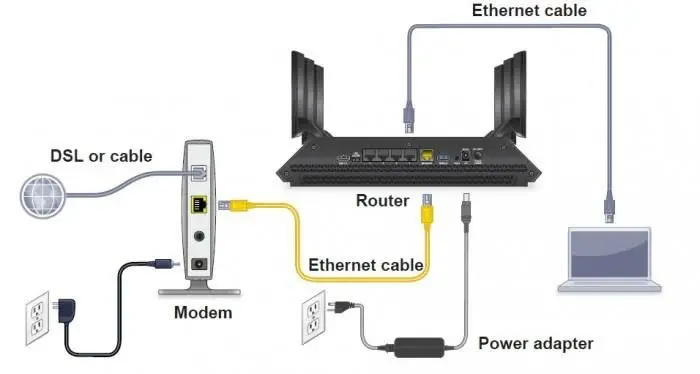
When You Set Up Your Office Wi-Fi Router, Avoid These Five Mistakes
Nothing is more annoying than a bad internet connection. You know how frustrating it is when YouTube videos will not play and just keep buffering, or when the TV screen is blank and takes forever to load, or when you get disconnected from a meeting
These problems do not just happen because of issues. Most of the time, they happen because Your Office Wi-Fi Router is not installed correctly. It is really important to get it right from the start, which is why many businesses get help from a reliable IT AMC service in Dubai to set up their office Wi-Fi router and avoid these problems.
Let’s look at the five common mistakes businesses make when they set up their office Wi-Fi router and how to avoid them.
1. Putting Your Office Wi-Fi Router in a Corner or Behind Furniture
Your office Wi-Fi router sends out signals in all directions. We still like to hide it in a drawer behind the TV or in a corner. It might look nicer. Your office Wi-Fi router connection will be bad.
The solution is simple. Put Your Office Wi-Fi Router in a spot where the signals can go everywhere in your office. If you can put it up high. It works better on a shelf than on the floor behind a cabinet.
2. Keeping the Default Settings on Your Office Wi-Fi Router
That sticker on Your Office Wi-Fi Router with the default network name and password? If you do not change it, it is like giving your office keys to strangers. When you keep the credentials that came with your office Wi-Fi Router it is easy for hackers to get into your network.
Take a few minutes to change the network name and password to something. You will be happy you did it.
3. Not Securing the Smart Devices on Your Office Wi-Fi Router
This is something that many people forget. All the smart devices in your office, like printers, smart TVs, and security cameras, can be used by hackers to get into your network. If they are all connected to your network, a problem with one device can affect everything.
Setting up a network for these devices keeps your main computers and phones safe. It only takes a minute to set up, and it will keep your office Wi-Fi router secure.
4. Never Restarting or Updating Your Office Wi-Fi Router
Your Office Wi-Fi Router needs to be maintained. Regular updates fix security problems. Make it work better, but most people set it up and forget about it. If Your Office Wi-Fi Router has not been restarted in months, it is probably working more slowly than it should. Might have security problems.
Schedule a restart and check for updates. It is simple to do. It will keep Your Office Wi-Fi Router working well.
5. Choosing the Wrong Frequency Band on Your Office Wi-Fi Router
Not all Wi-Fi bands are the same. The 2.4 GHz band goes further. Is slower while the 5 GHz band is faster, but does not go as far. If your business does a lot of work with video or large files, you will probably want to use the 5 GHz band. For tasks like browsing, the 2.4 GHz band is fine.
Understanding what your business needs will help you choose the frequency for the right tasks.
Getting these basics right will make your office internet connection much better. You will not have to worry about meetings getting disconnected or videos not loading. You will just have an internet connection that works when you need it, and that is, for Your Office Wi-Fi router.
Essential WiFi Settings Every Office Should Know
Even small changes can improve your network experience. Here’s a way to change your WiFi name:
Step 1: Connect your PC or smartphone to the router’s network.
Step 2: Open a web browser. Type the router’s IP address. Common IP addresses are 192.168.1.1 and 192.168.0.1.
Step 3: Log in using your router’s username and password.
Step 4: Navigate to the Wireless or Wi-Fi settings.
Step 5: Find the SSID field, which contains your network’s name.
Step 6: Choose a name, such as OfficeWiFi or CompanyName_WiFi.
Step 7: Choose Save or Apply Settings. Your network will restart under the name.
Conclusion
A fast and reliable internet connection ensures that your business runs smoothly. For help, FSI Information Technology provides the best IT annual maintenance contract in Dubai. We offer controlled systems, cloud-based wireless management, and expert access point installation throughout Dubai. Don’t let WiFi issues hold you back—work with the experts today.